Showing posts with label Clones. Show all posts

Beautiful Social Subscription Widget for Blogger

11 Comments
Beautiful Social Subscription Widget for Blogger
Social widgets is one of important widget in blogger blogs.They makes your users to easily spread your words all around the world.Social network also play a major role in your website traffic.Today I camed with a social widget which looks beautiful , Elegant and adopts with your blog width.This widget enable your user to connect with your blog in all top social sites like Facebook, RSS ,Twitter,Google plus, LinkedIN and Youtube.This widget is used by Chandeep in his blog.Lets see the Demo


How to Add this Widget to Blogger ?

Adding this widget to blogger is very simple just follow these steps:
  • Go to your Blogger Dashboard
  • Then Go To Layouts----> Add A Widget-----> Html Javascript
  • Just paste these Codes in your respective gadget box.

<div class="btnt-chronicl-social"><ul><li><a class="rss" href="http://feeds.feedburner.com/truebloggertricks">Subscribe to the RSS Feed</a></li> <li><a class="twitter" href="https://twitter.com/tbloggertricks">Follow me on Twitter</a></li> <li><a class="facebook" href="https://www.facebook.com/truebloggertricks">Find me on Facebook</a></li> <li><a class="google" href="https://plus.google.com/100090854666031755159" rel="author">Join me on Google+</a></li> <li><a class="linkedin" href="http://in.linkedin.com/your url">Connect with me on LinkedIn</a></li> <li><a class="youtube" href="http://www.youtube.com/user/username">Watch me on YouTube</a></li>
</ul></div><style type="text/css">.btnt-chronicl-social { width: 100%; } .btnt-chronicl-social ul { border: 1px solid #CCCCCC; margin: 0; padding: 0; } .btnt-chronicl-social ul li { list-style:none; padding: 0; text-transform: none; border-bottom: 1px solid #CCCCCC; border-top: 1px solid #FFFFFF; } .btnt-chronicl-social ul li:first-child { border-top: 0 none; } .btnt-chronicl-social ul li:last-child { border-bottom: 0 none; } .btnt-chronicl-social ul li a { background-color: #F2F2F2 !important; color: #404040; display:block; } .btnt-chronicl-social ul li a:hover { background-color: #fafafa !important; } .btnt-chronicl-social ul li .rss { background: url("http://i1203.photobucket.com/albums/bb382/chandeep10/social-icons/RSS-1.png") no-repeat scroll 10px center #F87E12; padding: 17.5px 60px; } .btnt-chronicl-social ul li .twitter { background: url("http://i1203.photobucket.com/albums/bb382/chandeep10/social-icons/Twitter.png") no-repeat scroll 10px center #4CACEE; padding: 17.5px 60px;} .btnt-chronicl-social ul li .facebook { background: url("http://i1203.photobucket.com/albums/bb382/chandeep10/social-icons/Facebook-1.png") no-repeat scroll 10px center #3B5998; padding: 17.5px 60px; } .btnt-chronicl-social ul li .google { background: url("http://i1203.photobucket.com/albums/bb382/chandeep10/social-icons/google.png") no-repeat scroll 10px center #D44937; padding: 17.5px 60px; } .btnt-chronicl-social ul li .linkedin { background: url("http://i1203.photobucket.com/albums/bb382/chandeep10/social-icons/LinkedIn-1.png") no-repeat scroll 10px center #3692C3; padding: 17.5px 60px; } .btnt-chronicl-social ul li .youtube { background: url("http://i1203.photobucket.com/albums/bb382/chandeep10/social-icons/Youtube-1.png") no-repeat scroll 10px center #C6312B; padding: 17.5px 60px; } .social-about { display: none; }</style>

Customization:

 Just replace following with your respective URL
  •  http://feeds.feedburner.com/truebloggertricks
  •  https://www.facebook.com/truebloggertricks
  • https://plus.google.com/100090854666031755159
  • http://www.youtube.com/user/username 
  • http://in.linkedin.com/your url

Thats all!If you liked this widget, please share with your friends.Happy Blogging:)
Read More

Top Blogging Ideas like responsive blogger template(clone)

13 Comments
First of all, happy Christmas to all my readers and fans.As I am searching for new ideas for my next post , I found a beautiful responsive blogger template used in Topbloggingideas.This is a responsive template which makes everyone to like your blog.This template adopts to all devices such as ipad,iphone,mobile and computer.This template is highly fastloading than any other template.This template is rated as 98 out of 100 google pagespeed.Unnecessary widgets and script are removed to make this template fast loading.Lets see the live demo of this beautiful template.


Special Features:

  • Highly Fast loading
  • Elegant look
  • Responsive design
  • professional look
  • No Auto readmore widget
  • Beautiful Background
  • Customised Headings
  • Colourful menus
  • Left sidebar
  • Easy Edting
  • Stunning comment section
  • Inbuilt Social widgets
  • And much more

Note:

       If you are a true and genuine blogger,Kindly please leave the footer link.This single link will not make your template ugly.
 
If you are satisfied with this template,Kindly Do this,
  • Like us on Facebook.
  • Follow Us on Twitter .
  • Subscribe to our Updates by filling the form below the post where it says "Enter Your Email Here"and click on submit.
  • Join this site with google connect.           
 If you find any errors or doubts in this template,Feel free to ask to the author.
Read More

Mybloggertools like blogger template

14 Comments
mybloggertools like template
Hi dudes, As many users requested to clone mybloggertools template.I finally came with that template.But This is not a exact clone of mybloggertools..As we received some complaints for cloning.We banned that process.So,To fullfill my users request,I am going to give good alternative to that.My sincere Thanks to friend Verma who helped in some css and menus.This blog template has many advandages and feature.First try the Demo.


Special Features:

  • Fast loading
  • Adsense optimised
  • MBT like layout
  • Auto readmore widget
  • Beautiful Background
  • Customised Headings
  • Colourful menus
  • Two menus
  • Easy Edting
  • Stuning comment section
  • And much more

Note:

       If you are a true and genuine blogger,Kindly please leave the footer link.This single link will not make your template ugly.
 
If you are satisfied with this template,Kindly Do this,
  • Like us on Facebook.
  • Follow Us on Twitter .
  • Subscribe to our Updates by filling the form below the post where it says "Enter Your Email Here"and click on submit.
  • Join this site with google connect (or)
  • Comment with your blog address to which the template is applied.           
Read More

Lord HTML like blogger template(clone)

34 Comments
Lord HTML like blogger template(clone)
 Lord HTML is one of the developing tech blog in blogger platform.This blog is administrated by very young blogger Aumkar Thakur of India. Many bloggers are inspired by his post.He has applied a awesome template to his blog which is not yet revealed.I am going to give this template to all bloggers.I hope he will not be angry with me for revealing his beautiful template!!! Lets see the Demo of the template.


Special features :

  • Nice and Simple Design
  • Responsive theme
  • SEO Optimized
  • No Footer Widgets
  • Navigation Menus
  • Search bar 
  • Custom About me widget
  • Page navigation Widget
  • Stunning Threaded Comments Section
  • Default Jump Breaks for Post excerpts
  • Custom Email subscription widget
  • Customized heading tags (h1 to h6)
  • HTML Code view 
  • Adsense optimised.

Note:

       If you are a true and genuine blogger,Kindly please leave the footer link.This may help many bloggers like you.

If you are satisfied with this template,Kindly Do atleast one,
  • Like us on Facebook.
  • Follow Us on Twitter .
  • Subscribe to our Updates by filling the form below the post where it says "Enter Your Email Here"and click on submit.
  • Join this site with google connect
Read More

Pinterest like blogger template(clone)

2 Comments

Pinterest like blogger template(clone)

Pinterest is a pinboard-style social photo sharing website that allows users to create and manage theme-based image collections such as events, interests, hobbies, and more.It is not hosted in blogger.But,here comes blogger version of pinerest.If you are also having a photography website then you should add this template to your blogger blog.This template is very fast loading and does not want any editing.Lets see the demo

DEMO 

Home page:

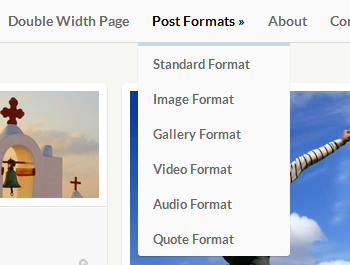
This template have a same feel and style like Pinterest Pinboard.In footer of Pinboard there are several social media sharing buttons.

Pinterest like blogger template(clone)


Customize Social Widget


social

To customize social follow buttons according to your follow below steps-

  • Go to Blogger >> Template >> Proceed
  • Search For <div class='header-wgt group'> (Tip: - Press Ctrl + F)
  • And just beneath the <div class='header-wgt group'> you will see a chain of coding as mentioned below.

<aside class='widget group widget_ci_social_widget'>
 <a class='icn twitter' href='https://twitter.com'>Twitter</a>
 <a class='icn facebook' href='http://www.facebook.com'>Facebook</a>
 <a class='icn pinterest' href='http://pinterest.com'>Pinterest</a>
 <a class='icn youtube' href='http://www.youtube.com'>Youtube</a>
</aside>

Now replace highlighted social links according to you.

Customize Drop Menu


Pinterest like blogger template(clone)

  • Go to Blogger >> Template >> Proceed
  • Now Search For <div class='wrap group'> (Tip: - Press Ctrl + F)
  • And Just below the <div class='wrap group'> you will witness a chunk of coding as shown below.

 <ul class='group' id='navigation'>
 <li class='current_page_item'><a href='#'>Home</a></li>
 <li><a href='#'>Page Template</a></li>
 <li><a href='#'>Double Width Page</a></li>
 <li><a href='#'>Post Formats</a>
 <ul>
 <li><a href='#'>Standard Format</a></li>
 <li><a href='#'>Image Format</a></li>
 <li><a href='#'>Gallery Format</a></li>
 <li><a href='#'>Video Format</a></li>
 <li><a href='#'>Audio Format</a></li>
 <li><a href='#'>Quote Format</a></li>
 </ul>
 </li>
 <li><a href='#'>Contact</a></li>
 </ul>

Now Replace Text And Link According To You.


If you are satisfied with this template,Kindly Do this,
  • Like us on Facebook.
  • Follow Us on Twitter .
  • Subscribe to our Updates by filling the form below the post where it says "Enter Your Email Here"and click on submit.
  • Join this site with google connect


About The Author
This amazing Pinterest Style Blogger Template Is Made By soratemplates.com.
Read More

Stylifyyourblog like blogger template(clone)

7 Comments
Stylifyyourblog like blogger template(clone)
Are you in search of stylifyyourblog template? You came to correct place.SYB is a blog dedicated to bringing you useful and quality content related to Blogger including News, Gadgets, Hacks, Tips, Templates and Tutorials.SYB is administrated by a talented blogger Prayag Verma
This is a fully responsive and highly optimized template for every kind of Blogger user. It is centered around the concept of Minimalism hence all the unnecessary stuff like Blogger's Default CSS as well as JavaScript have been shunned.Lets see the live DEMO.


Special Features :

- Responsive
- Search Engine Optimized
- Lightening fast Page Load Time (98% in Google Page Speed)
- Exclusive Threaded Comment Design
- CSS3 powered Tilted Header
- Supports All Major browsers
- Uses CSS Sprites for less HTML Requests
- Auto Read More Hack
- Pagination option
- Automatic Related Posts under each Post
- CSS3 powered ReadMore Button and Labels
- Electrolize Web Font
- Attractive Share Buttons and Subscribe options
- Author Bio Box
- Ribbon styled Labels on Post Pages
- Print Friendly
- Captivating Post Title design
- Near W3C Valid
- Four Column Footer
- Widget Ready Sidebar with Stacked effect
- Simple Menu and Social Media Buttons
- Automatic Meta Descriptions
- Stacked Paper feel to Post Body
- Appealing Custom 404 Design
- Simple Search Box

Download:

       If you are a true and genuine blogger,Kindly please leave the footer link.This may help many bloggers like you.

If you are satisfied with this template,Kindly Do this,
  • Like us on Facebook.
  • Follow Us on Twitter .
  • Subscribe to our Updates by filling the form below the post where it says "Enter Your Email Here"and click on submit.
  • Join this site with google connect


Note
This is a modified stylify minimal template So, All credits goes to Prayag verma of Stylifyyourblog
Read More

Blogtipsntricks like blogger template(clone)

37 Comments
Blogtipsntricks like blogger template(clone)
After Posting helperblogger template,I did not post any cloned template to my users.But now I camed with a new cloned template which make you amaze at look.I am going to give you blogtipsntricks.com template which got page rank 3 and my favourite blog too!

This blog is administrated by a 17 years old blogger Chandeep who is currently living in India like me.He has a beutiful blog which deals about blogger tricks and tricks like our blog and He has also created a wonder blogger template Chroncl which you can get it from this blog.He has a wonderful template in his blog which stands totally unique from other blog.

Now I am going to give his beautiful template for my readers and users for totally Free!Lets see the Demo of the template.


The main Features of this Blogger Template

  • Nice and Simple Design
  • Responsive theme
  • SEO Optimized
  • Navigation Menus
  • Search bar 
  • Custom About me widget
  • Page navigation Widget
  • Stunning Threaded Comments Section
  • Default Jump Breaks for Post excerpts
  • Custom Email subscription widget
  • Customized heading tags (h1 to h6)
  • HTML Code view 
  • Custom landing page

Download:

                       This template is only available for premium members .
 
To get this template,Kindly Do this:
  • Like us on Facebook.
  • Follow Us on Twitter .
  • Subscribe to our Updates 


  • Join this site with google connect
  • After doing all, kindly leave your mail id in the comment  

We respect our users so the templates our delivered soon to email id upon our review

"This post is copy righted and should not be reproduced in any blogs"
Read More

Helper Blogger like blogger template(clone)

13 Comments
Helper Blogger like blogger template(clone)
First of all ,Happy Diwali to all my readers and visitors.If you are a Indian you would celebrate it with bursting crackers and with sweets.But,I am busy with something.Ya! you are right, 'Cloning templates '.I tried to Clone Helperblogger template,but it camed perfectly! Helperblogger is a blog administrated by a young blogger Rahul Ippar and It also has a pagerank of 3!I want to share this template as a Diwali gift to Everyone.Let see the Demo


Demo 

Benefits of this template:

  • Wordpress like
  • Round corners
  • Superb sub menu
  • Adsense optimised
  • Fast loading
  • Simple and Elegant
  • Magazine type
  • Featured Section
  • Right Sidebar
  • Tabbed widget
  • 3 Column footer
  • Professional
  • Custom fonts

Note:

       If you are a true and genuine blogger,Kindly please leave the footer link.This may help many bloggers like you.
 
If you are satisfied with this template,Kindly Do this,
  • Like us on Facebook.
  • Follow Us on Twitter .
  • Subscribe to our Updates by filling the form below the post where it says "Enter Your Email Here"and click on submit.
  • Join this site with google connect (or)
  • Comment with your blog address to which the template is applied.           
Read More

Spiceupyourblog like comment design in blogger

7 Comments
Spiceupyourblog is a beautiful blog with unique design.Paul crowe is owner of that blog.I also shared spiceupyourblog template in previous post. In this tutorial you will learn how to make your blogger comment system design like on Spiceup your blog.
SYB is well designed by Paul Crowe. But the comment system design is one of the best thing we find in SYB, the design and it's look makes the comments easier to understand. 


You can also see the Demo here
DEMO 

To make this type of comment system is very simple.Just you have to do 2 steps
  • Enable threaded comment in your blog
  • Applying CSS in your template

Enable threaded comment in your blog:

  1. Blogger Dashboard > Select the Blog that you want to enable the Threaded Comments
  2. Go to Settings > Posts and Comments
  3. Comment Location option set to Embedded
    Enable Official Blogger Threaded Comments
  4. Go to Settings > Other 
  5. Allow Blog Feed option set to Full
    Enable Official Blogger Threaded Comments
Still not getting Threaded Comments?

Backup your Template before going to change any thing.

Method 1:

You will lost all Changes in Blog Posts and Widgets. like, Adsense Ads inside Post,Post Footer changes, Share Buttons, Signatures etc,.!!
  1. Go to Design > Edit HTML
  2. Click on Revert widget templates to default link
This will Discard the all Changes Widget and revert to Default. This is Best suitable for non Custom Templates.

For Custom Template Follow the Method 2

Method 2:

  1. Go to Template > Edit HTML
  2. Click on Expand Widget Templates Check box
  3. Find the Following code.
    <b:if cond='data:blog.pageType == &quot;static_page&quot;'> <b:include data='post' name='comments'/> </b:if> <b:if cond='data:blog.pageType == &quot;item&quot;'> <b:include data='post' name='comments'/> </b:if>
  4. You will get Two results. one is belongs to mobile template and other is belongs to web Template.
    Replace it with the Below Section of Code on both mobile and web template.  

    <b:if cond='data:blog.pageType == &quot;static_page&quot;'> <b:if cond='data:post.showThreadedComments'> <b:include data='post' name='threaded_comments'/> <b:else/> <b:include data='post' name='comments'/> </b:if> </b:if> <b:if cond='data:blog.pageType == &quot;item&quot;'> <b:if cond='data:post.showThreadedComments'> <b:include data='post' name='threaded_comments'/> <b:else/> <b:include data='post' name='comments'/> </b:if> </b:if>
  5. Save the Template!

Applying CSS in your template :

It can be done easily with CSS. You can make changes to the CSS if you understand what you are doing or you may just ignore making any changes. Follow these Instruction to add this long CSS
  1. Go to Blogger Dashboard 
  2. Now click on the Template tab
  3. Click on the Customize button
  4. Select the Advance tab > scroll down and Add CSS 
  5. Now you will see a textarea on right side, this is where you have to paste the HTML
    @font-face { font-family: 'Philosopher'; font-style: normal; font-weight: 400; src: local('Philosopher'), url(http://themes.googleusercontent.com/static/fonts/philosopher/v4/OttjxgcoEsufOGSINYBGLYbN6UDyHWBl620a-IRfuBk.woff) format('woff'); } .comment .avatar-image-container { border: 1px solid #B6B6B6; max-height: 70px !important; margin-top: -5px; width: 70px !important; position: relative; z-index: 50; } .comment .comment-block { margin-left: 75px !important; } .comment .comment-header { background: none repeat scroll 0 0 #A9F5D0; color: #333; font-size: 15px; font-weight: bold; margin-left: 60px; } .comment .comment-header a { color: white !important; text-decoration: none; } .comment .comment-content { background: none repeat scroll 0 0 #FEFFF9; border-bottom: 2px solid #E6E6E6; font-size: 14px; margin: 0 0 30px; padding: 5px 5px 10px 10px; } .comment .comment-actions a { background: none repeat scroll 0 0 #DDD; color: #333; display: inline-block; line-height: 1; margin: 0 3px; padding: 3px 6px !important; text-decoration: none; } .comment .comment-actions a { background: none repeat scroll 0 0 #DDD; color: #333; display: inline-block; line-height: 1; margin: 0 3px; padding: 3px 6px !important; text-decoration: none; } .comment-header cite { background: none repeat scroll 0 0 #DF7401; border: 1px solid white; color: white; padding: 2px 20px; position: relative; z-index: 99; margin-left: -20px; } cite.blog-author { background: none repeat scroll 0 0 #8181F7 !important; } .icon.blog-author { display: none !important; background: url("") no-repeat scroll 0 0; margin-left: 90px; width: 60px !important; height: 60px !important; position: absolute; right: 5px; bottom: 5px; top: 10px; } .comment .comment-header { color: #333; font-size: 15px; font-weight: bold; } .comment .avatar-image-container img { border: medium none !important; height: 70px !important; width: 70px !important; max-height: 70px !important; max-width: 70px !important; } .comment .comment-actions a { background: none repeat scroll 0 0 #DDD !important; color: #333 !important; display: inline-block !important; line-height: 1 !important; margin: 0 3px !important; padding: 3px 6px !important; text-decoration: none !important; font-size:16px; } .comment .comment-actions a:hover { background: #CCC !important; text-decoration: none !important; } .comments { font-family: 'Philosopher', arial, serif !important; font-size: 1em; color: black; } .comments .continue a { display: block !important; font-weight: bold !important; padding: .5em !important; color:#E34600; font-size:16px; } .comments .continue a:hover {color:#4D3123;text-decoration:none;} .item-control { display: none !important; } .comments .continue { border-top: 2px solid transparent !important; }
Then open your blog and see the comment system.If it does not works for you,please comment below.
Read More

Bloggertricksdotbiz like blogger template

4 Comments

After long time,I came with a new template which is a clone of bloggertrick.biz.This is a popular blog deals about blogger tricks and widgets like us.This blog is updated by a young blogger Vijay prakash and he also have a users more than 1500.He has a good looking template so I wanted to share with my users.I have changed some of the items.Let see the Demo of that template


Benefits of this blog: 

  • Super SEO
  • White clean
  • Related post widget
  • Subscribe widget in all post 
  • 3 footer widget
  • Left sidebar
  • Adsense enabled  
  • 90 in page speed
  • Best for all sites

Download:

     If you are a true and genuine blogger,Kindly please leave the footer link.This may help many bloggers like you.

 
If you are satisfied with this template,Kindly Do this,
  • Like us on Facebook.
  • Follow Us on Twitter .
  • Subscribe to our Updates by filling the form below the post where it says "Enter Your Email Here"and click on submit.
  • Join this site with google connect           
Read More

Mybloggertricks(MBT) like blogger comment(Expand/collapse)

10 Comments

blogger comment form

In my previous posts, i have given you the most of tutorials regarding both Jquery function and Blogger Comment form customizations. The only drawback that can be noticed in both of these concepts is that the blogger comment form is still in its old traditional appearance and may be the blogger team not felt it more important to bring some extra features in blogger comment form. So i myself thought of merging these two concepts and give some special effect to blogger comment form.

Finally i decided to implement some sort of Jquery toggle function and make the blogger comment form more inspiring one and in the same aspect I choosed the Jquery Toggle effect on mouse click event for this and the live demo of it can be clearly viewed in the comment form of this blog

Implementing Jquery Toggle Effect

1. Go to blogger dashboard --> Template --> Edit Html ( Tick the Expand widget Template option).
2. Find for <head> tag and place the following peace of code just below it.
<script src='http://ajax.googleapis.com/ajax/libs/jquery/1.7.1/jquery.min.js' type='text/javascript'/>
<script type='text/javascript'>
$(document).ready(function(){
$(&quot;.toggle_box&quot;).hide();
$(&quot;h3.expand&quot;).click(function(){
$(this).toggleClass(&quot;active&quot;).next().slideToggle(&quot;slow&quot;);
});
});
</script>
Hint:-
h3.expand is the class for your comment form headline that expands the contents[toggle_box] upon the mouse click on it.
Here toggle_box is the class of your comment form contents i.e., the content that should be displayed when expanded.

Style for toggle element and its content box

3. Now find(Ctrl+F) for ]]></b:skin> and place the following peace of style code just above it.
/*----- Toggle Comment Form by http://truebloggertricks.blogspot.com ----*/
h3.expand {
background: url(https://blogger.googleusercontent.com/img/b/R29vZ2xl/AVvXsEjPEdC-sJjSxNokR8EhbC2Bp5VPnjnciiHd8S5Fx8TFHOcSVwBM7SC_Vda7GvN5RSongfPrT6Xo3VwAmtY3nciwUXF4wGBFpvY3iAPTqFBS57TP902R7-PqTBrrdOZRVX0Bz9c5mDG1Pl8/s1600/comment-boxbg.png) no-repeat;
height: 44px;
line-height: 46px;
width: 518px;
font-family:Georgia, "Times New Roman", Times, serif;
font-size: 1.4em;
font-weight: bold;
text-align:left;
border-radius:4px;
color:#A1A1A1;
float: left;
cursor:pointer;
box-shadow: #333 0px 1px 3px;
padding:0 0 0 50px;
margin:10px 0px 10px 10px;
}
h3.active {
background-position: bottom left;
color:#ddd;
}
.toggle_box {
padding-left:10px;
overflow: hidden;
clear: both;
}
Hint:-
The Css style for the visible,active header and the content box is specified above. You can however easily modify it as you wish.

Adding Html Code

4. Now find for the following code.
<b:includable id='comment-form' var='post'>
5. Paste the following peace of code just below it.
<h3 class='expand'>Click Here To add Comment</h3>
<div class='toggle_box'>
<div class='block'>
6. Paste two div closing tags just before its closing includable tag as shown below.
<b:includable id='comment-form' var='post'>
<h3 class='expand'>Click Here To Add Comment</h3> 
<div class='toggle_box'> 
<div class='block'>
<div id='bt-form'>
<a name='comment-form'/><br/>
<h4 id='comment-post-message'>
<p><data:blogCommentMessage/></p>
<data:blogTeamBlogMessage/>
<a expr:href='data:post.commentFormIframeSrc' id='comment-editor-src'/>
<iframe allowtransparency='true' class='blogger-iframe-colorize' frameborder='0' height='275' id='comment-editor' scrolling='no' src='' width='580px'/>
<data:post.iframeColorizer/>
</div>
</div> 
</div>
</b:includable>
7. Finally Save your template and view your comment form.
Read More

Spice up your blog like blogger template(clone)

30 Comments
spiceupyourblog like template(clone)
After giving you a MBT template,I liked cloning template.After some days my user asked me to clone spiceupyourblog template.Then I saw that site and collected information about it.Spiceupyourblog has users more than 4k and it was administrated by Paul crowe.That site was dealing with blogger tips and tricks and He also having a another blog which contains blogger template.Then I stared to convert the template.But it is harder than MBT because I Cannot find the source of that template.Then i used another trick to clone that template.I splited that template into many parts and replaced with mine then i got a beautiful spiceupyourblog template!.First see the demo.


Speacial features:

  • Build with SEO
  • Attractive Design
  • Superb ads
  • User attractive
  • Subscription widget
  • Left Sidebar
  • Auto read more for webmasters
  • Best for Adsense
  • 93 out of 100 in google page rank
  • Professional
  • Custom fonts

Note:

       If you are a true and genuine blogger,Kindly please leave the footer link.This may help many bloggers like you.
If you are satisfied with this template,Kindly Do this,

  • Like us on Facebook.
  • Follow Us on Twitter .
  • Subscribe to our Updates by filling the form below the post where it says "Enter Your Email Here"and click on submit.
  • Join this site with google connect            
After downloading this template kindly read this:

Read More

Mybloggertricks(MBT) like blogger template(clone)

19 Comments


Every one like mybloggertricks blog which is well known for blogger tips and tricks.That blog has more than 13k facebook users and more than 13k RSS users.Mohammad Mustafa Ahmedzai the owner of MyBloggerTricks, he is a very loyal and good author he always presents us with beautiful templates and widgets for bloggers and other blogger resources and SEO tips and tools. But he never shared his good looking template with anyone.In begining of this blog I refered that site to build my blog.It was a beautiful tech blog with super SEO template.Every one has a feeling to get that template.I also had that feeling to that template for my blog.I started to search for that template in all search engine but I cannot the real one.But I got a big teasure in find this.That teasure is MBT's churuch template,which look alike a mbt's blog.I downloaded that template and started to modify into real mbt's template.It took one full week to make template.Finally I did this!


Benefits of this template:

  • Fully SEO optimised
  • Auto read more for webmasters
  • Related post widget
  • Mouse over effect blockquote
  • Best template for ads
  • 3 Column Footer 
  • 3 Columns
  •  Professional
  • Full image for header 
  • 90 score out of 100 in page speed

Note:

       If you are a true and genuine blogger,Kindly please leave the footer link.This may help many bloggers like you.

If you are satisfied with this template,Kindly Do this,
  • Like us on Facebook.
  • Follow Us on Twitter .
  • Subscribe to our Updates by filling the form below the post where it says "Enter Your Email Here"and click on submit.
  • Join this site with google connect
After downloading read this:

Read More

Get Ads Box with cool CSS effect as used in Spice Up Your Blog

6 Comments
Click to enlarge the image (on the image)
Hi guys as every one knows these days the Spice Up Your Blog ads widget for the blogs are very hot to be seen and look well equipped ad box with some cool rates going high well with this post you can also get the same kind of ad widget as shown in the image beside even at your blog. This widget has got cool CSS effect  so that it makes all the advertisers think that this blog is well designed and developed and get cool advertisers.First see the demo:


To do this just follow the steps given below:                                                      

Step 1. Go to your Blogger Dashboard => Template => Click Edit HTML => Search ]]></b:skin> and paste the following code in the content area before the above given code asked to search for.


/* -------------------Ads------------------*/
div.bsap_125 a{width:125px;display:block;font-size:11px;color:#888;font-family:verdana,sans-serif;text-align:center;text-decoration:none;overflow:hidden;float:left;line-height:100%;margin:0 4px 10px 0;}
div.bsap_125 img{border:2px solid #ddd;clear:right;padding:5px;}
div.bsap_125 a.adhere{color:#666;font-weight:bold;font-size:12px;border:2px solid #ccc;background:#e7e7e7;text-align:center;width:125px;height:125px;line-height:1000%;}
div.bsap_125 a.adhere:hover{border:2px solid #999;background:#ddd;color:#333;}
html>

body div.bsap_125 a.adhere{width:123px;height:123px;}
div.bsap_468 a{width:468px;display:block;font-size:11px;color:#888;font-family:verdana,sans-serif;text-align:center;text-decoration:none;overflow:hidden;line-height:100%;margin:0;}
div.bsap_468 img{border:0;clear:right;}
div.bsap_468 a.adhere{color:#666;font-weight:bold;font-size:12px;border:1px solid #ccc;background:#e7e7e7;text-align:center;width:468px;height:60px;line-height:480%;}
div.bsap_468 a.adhere:hover{border:1px solid #999;background:#ddd;color:#333;}
html>

body div.bsap_728 a.adhere{width:726px;height:90px;}
div.bsap_728 a{width:468px;display:block;font-size:11px;color:#888;font-family:verdana,sans-serif;text-align:center;text-decoration:none;overflow:hidden;line-height:100%;margin:0;}
div.bsap_728 img{border:0;clear:right;}
div.bsap_728 a.adhere{color:#666;font-weight:bold;font-size:12px;border:1px solid #ccc;background:#e7e7e7;text-align:center;width:128px;height:90px;line-height:730%;}
div.bsap_728 a.adhere:hover{border:1px solid #999;background:#ddd;color:#333;}
html>

body div.bsap_336 a.adhere{width:334px;height:280px;}
div.bsap_336 a{width:468px;display:block;font-size:11px;color:#888;font-family:verdana,sans-serif;text-align:center;text-decoration:none;overflow:hidden;line-height:100%;margin:0;}
div.bsap_336 img{border:0;clear:right;}
div.bsap_336 a.adhere{color:#666;font-weight:bold;font-size:12px;border:1px solid #ccc;background:#e7e7e7;text-align:center;width:336px;height:280px;line-height:2200%;}
div.bsap_336 a.adhere:hover{border:1px solid #999;background:#ddd;color:#333;}
html>

body div.bsap_468 a.adhere{width:466px;height:58px;}
.bsap a{text-shadow:1px 1px 1px #111!important;color:#eee!important;overflow:visible!important;-webkit-transition:all .2s ease;-moz-transition:all .2s ease;-o-transition:all .2s ease;border:0 none!important;-webkit-border-top-left-radius:80px;-webkit-border-bottom-right-radius:80px;-moz-border-radius-topleft:80px;-moz-border-radius-bottomright:80px;border-top-left-radius:80px;border-bottom-right-radius:80px;margin:0 10px 10px 0 !important;padding:7px!important;}
.bsap a:hover{-webkit-border-top-left-radius:40px;-webkit-border-bottom-right-radius:40px;-moz-border-radius-topleft:40px;-moz-border-radius-bottomright:40px;border-top-left-radius:40px;border-bottom-right-radius:40px;}
.bsap a img{border:0 none!important;-webkit-box-shadow:0 0 8px rgba(0,0,0,0.5);-moz-box-shadow:0 0 8px rgba(0,0,0,0.5);box-shadow:0 0 8px rgba(0,0,0,0.5);padding:3px!important;}
.bsap .even{margin-right:0!important;}
.bsap .ad1{background:#e42b2b!important;}
.bsap .ad2{background:#ff8400!important;}
.bsap .ad3{background:#a800ff!important;}
.bsap .ad4{background:#49a7f3!important;}
.bsap .ad5{background:#41d05f!important;}
.bsap .ad6{background:#B24700!important;}
.bsap .ad7{background:#FFE500!important;}
.bsap .ad8{background:#007D47!important;}
.bsap .ad9{background:#330000!important;}
.bsap .ad10{background:#990000!important;}
.bsap .ad11{background:#f70000!important;}

Step 2: Click Save Template
Step 3: Go to "Layout - Page Elements"=>Click on Add Gadget=>create new HTML / JavaScript widget
Step 4: Copy the code in the field below and paste it in the new widget created:

The size of 125x125
<center>
<div id="bsap_125" class="bsap_125 bsap">
<a href="http://AddURL" class="ad1" title="Ad Title" id="bsa_1451626" target="_blank"> <img src = "http://Imageurl "alt ="AdName"height =" 125 "width =" 125 "/> </ a>
<a href="http://AdURL" class="ad2 even" title="Ad Title" target="_blank"> <img src = "http://AdURL"alt =" AdName "height =" 125 "width =" 125 "/> </ a>
<a href="http://AdURL" class="ad3" title="AdTitle" target="_blank"> <img src = "http://Ad Image URL "alt =" AdName "height =" 125 "width =" 125 "/> </ a>
<a href="http://AdURL" class="ad2 even" title="Ad Title" target="_blank"> <img src = "http://AdURL"alt =" AdName "height =" 125 "width =" 125 "/> </ a>
</ Div>
</ Center>

The size of 468x60

<div id="bsap_468" class="bsap_468 bsap">
<span class="bsap_468 bsap"> <a href="AdURL" title="Advertise Here" class="adhere ad4" target="_blank"> Advertise Here </ a> </ span>
</ Div>

The size of 728x90

<div id="bsap_728" class="bsap_728 bsap">
<span class="bsap_728 bsap"> <a href="ADURL" title="Advertise Here" class="adhere ad1" target="_blank"> Advertise Here </ a> </ span>
</ Div>

The size of 336x280

<div id="bsap_336" class="bsap_336 bsap">
<span class="bsap_336 bsap"> <a href="ADURL" title="Advertise Here" class="adhere ad1" target="_blank"> Advertise Here </ a> </ span>
</ div>
Use the code below to add a picture

< img src="ImageURL" alt="AD Name" <img height="125" width="125" />
Orange Blocks Size color banner, change the numbers according to the code used.

P.S. The one Highlighted with purple should be changed with any thing you like among ad1 - ad11 (It changes the color of the background image)
And the one with red to be changed as directed.

Hopefully helpful, Good luck. If you any doubts please ask by commenting below....
Read More